Download My Notes free on android
APK file My Notes 3.7.1.0How to install APK / APKS / OBB file on Android
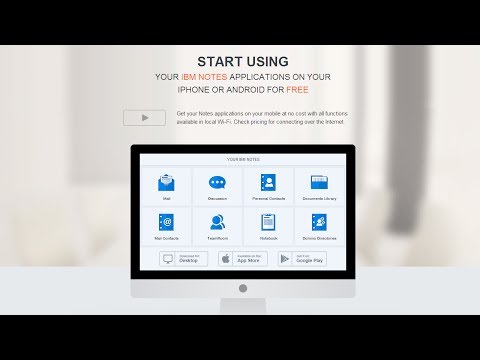

My Notes is designed to work with standard applications of IBM Notes (formerly Lotus Notes).
No server-side manipulations, configuration changes or applications templates modifications are needed to connect.
Start working with My Notes with 3 easy steps:
1. Install My Notes Desktop on your computer from http://www.mynotesapp.com/download/ and setup connection to IBM Notes;
2. Install the app on your mobile phone;
3. Launch the app and connect to Desktop by scanning QR code.
- - - MAIN ADVANTAGES - - -
* EASY INSTALLATION – no server-side manipulations, no IT staff involved, no administrative rights needed. All you need is your computer with IBM Notes installed and your phone;
* MULTIPLE PLATFORMS SUPPORTED – My Notes Desktop is available for Linux, Mac OS X and Windows computers;
* IBM NOTES APPLICATIONS SUPPORTED – Mail, Contacts, Domino Directories, Notebook/Journal. Other applications, such as Discussion/Forum, Documents Library, TeamRoom, are coming soon;
* WORKS IN ANY NETWORK – the app is switched automatically between direct connection when you are in local Wi-Fi network and our cloud service when you're connected over the Internet (paid subscription required);
* SECURITY – neither data nor passwords are stored on our servers. Data is strongly encrypted with AES and SSL when transmitted between your desktop and your phone;
* IBM NOTES SPECIFIC FEATURES – encrypted and signed messages support, follow-up flags, full-text search through all documents in databases, etc.
- - - SUBSCRIPTION AND PRICING - - -
When connected to a computer with My Notes Desktop directly, for instance, via local Wi-Fi network, you can use ALL FUNCTIONS of the application FOR FREE and ADS-FREE.
To use My Notes via any available Internet connection, including cellular networks, public or private Wi-Fi hotspots, you need to purchase Pro Subscription to connect via our cloud internet-service.
Please note that Pro Subscription is auto-renewing subscription.
Please update your My Notes Desktop to release 3.7.1 or above - http://www.mynotesapp.com/download.
- LicenseFree
- File nameMy Notes
- File Version3.7.1.0
- Package namecom.inexika.mynotes
- Size5.12 MB
- UploadedNovember 7, 2020
- Android4.1 or later
- CategoryBusiness
- DeveloperInexika Inc.
- Developer site
- Developer emailsupport@mynotesapp.com
- md5 hash9e25447d25226cc345e6f2e18158c062
- Architecture-
- Permissionsshow (19)